
How to Learn Anything Effortlessly in 5 Minutes a Day
I'm serious.

The New Year is upon us and — in lieu of some philosophy or prose on why you should get yourself together and seize the future — I’m going to give you a simple method on how you can learn anything, anywhere, effortlessly, and for free.
If you practice with what I am about to provide you, I promise you can learn anything with 5 minutes of practice per day.
No scribbling in notebooks.
No poring over obtuse texts.
No burying your head in endless and often unproductive studying.
You sit at your computer, click some buttons, and become a little smarter each day.
What you will need:
An AI (ChatGPT works fine)
Anki installed (on PC or Mac)
The material you would like to learn (can be sourced from AI, if needed)
While there is a mobile version of Anki, we will need a desktop/laptop for what we’re about to do. The desktop/laptop version is also free. Eventually, once you have everything setup, you can always migrate to mobile for when you’re on the go.

What is Anki and Why Does it Work?
Anki is a customizable flashcard system, but it’s also so much more than that. Simply put, it forces you to attempt to retrieve an answer without seeing it first. We can call this ‘cold retrieval’ or testing.
Say you’re learning Japanese. Anki presents you the word to learn, you take your best stab at it, and then hit ‘Show Answer’.
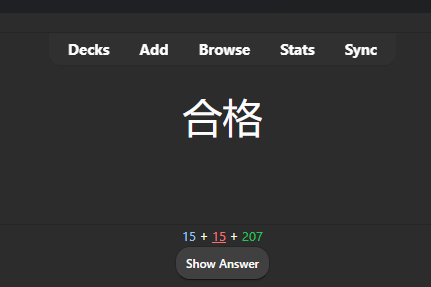
After you click (or hit spacebar) ‘Show Answer’, it then gives you the answer. This is immediate feedback which you use to rate your performance as: Again (you got it wrong), Hard, Good, or Easy.
Anki uses that information to determine how soon to show that flashcard to you again in the future. This is called spaced repetition.
Without boring you too much, testing your knowledge has repeatedly proven itself out to be the best way to learn. Repeatedly reading and engaging with material while making notes can work, but it’s often a waste of time. Especially in an age of distraction where you must fight for every ounce of focus.
Instead, we test ourselves and get the pain of immediate negative feedback (helps learn) — or we get the joy of successful recall (helps motivate).
The idea of spaced repetition is simple:
Anki shows the card to you again just as you’re about to forget it.
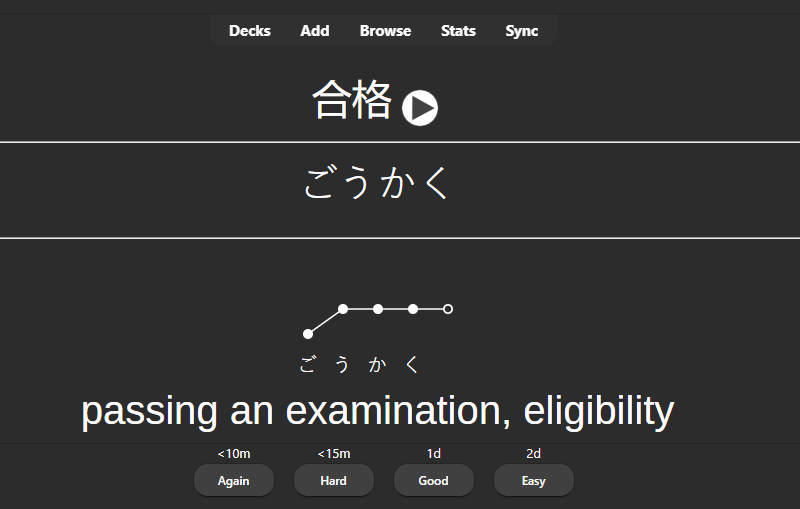
…and Anki isn’t just for language learning.
It can be used for any topic, subject, academia, or book.
The main shortcoming of Anki is we need an assembled set of Anki flashcards to use — or we need to make them ourselves. This is a pain, somewhat cumbersome, and time consuming. On top of that, making new cards/decks isn’t exactly intuitive at first.
Thankfully, we’ve got ChatGPT to make this effortless.
So here’s what we’re going to do:
Step 1 - Deck Creation
Make the Anki deck.
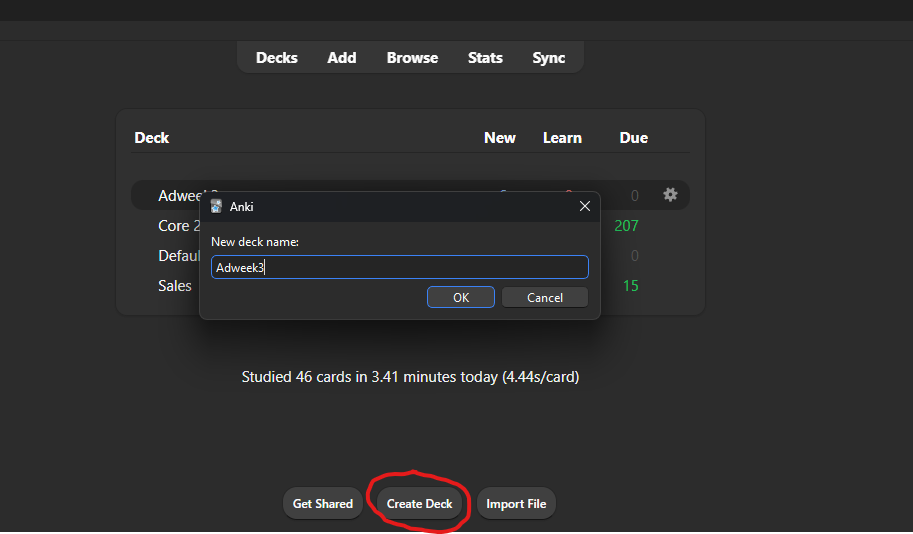
Step 2 - Prompt the AI
Copy-paste the following prompt into ChatGPT or your AI of choice:
Master Prompt: Turn Any Document/PDF Into Anki Flashcards
ROLE AND GOAL
You are an expert learning designer and Anki flashcard author. I will provide a document (text or pasted PDF content). Your job is to extract the core lessons, actionable data, key points, definitions, relationships, and anything integral to thorough knowledge of the material, then convert them into high-quality flashcards that optimize long-term recall.
INPUT
I will paste the document content below (or a section of it). If it is long, treat it as a “chapter” and still produce cards in a structured way.
OUTPUT REQUIREMENTS (CRITICAL)
    1. Return flashcards in a copy/paste-friendly format for Anki import as tab-separated values (TSV) with the following fields in this exact order:
        ◦ Front
        ◦ Back
        ◦ Tags
    2. Use these NoteTypes (choose the best one per card):
        ◦ Basic (Front → Back)
        ◦ Basic-Concept (definition + example)
        ◦ Basic-Process (steps, workflow, algorithm)
        ◦ Basic-Compare (contrast two items)
        ◦ Basic-Scenario (case prompt → best response/diagnosis/lesson)
        ◦ Basic-Quote (short quote snippet → meaning/significance/context)
    3. Tagging rules
        ◦ Always include: source_doc, chapter_or_section, and a subject tag such as philosophy, copywriting, science, medicine, or fiction.
        ◦ Add skill tags where relevant: definitions, frameworks, processes, examples, pitfalls, numbers, cause_effect, characters, plot, themes.
        ◦ Use snake_case only.
    4. Card design rules (do not violate)
        ◦ One idea per card.
        ◦ Prefer atomic recall over “essay answers.”
        ◦ If a fact is easily confused with similar facts, include a disambiguation cue in Front.
        ◦ Avoid trivia unless it supports understanding or application.
        ◦ When the document includes formulas, thresholds, dates, dosages, or numeric ranges, create dedicated numbers cards.
        ◦ When possible, source where the answer can be found in the text (Ex: Chapter 1, Page 27, etc).  Add this information to Back.
    5. Coverage goals
Create cards that test:
        ◦ Core concepts/definitions (what it is)
        ◦ Mechanisms/logic (why it works)
        ◦ Application (how to use it / what to do)
        ◦ Discrimination (how it differs from nearby concepts)
        ◦ Pitfalls and common errors (what not to do)
        ◦ Examples and counterexamples
        ◦ For fiction: characters, motivations, turning points, themes, causal chains, symbolism, and “what the story is saying.”
    6. Quantity and prioritization
        ◦ Produce 30–80 cards per ~10 pages of dense material (adjust down for light content, up for technical content).
        ◦ If the material is short, produce fewer cards but maintain coverage.
        ◦ If the material is huge, produce cards for the section provided and include a “What to process next” list.
WORKFLOW (FOLLOW THIS ORDER)
    1. Outline extraction (brief): Identify the 5–15 most important takeaways/frameworks/events in the provided text.
    2. Card plan: List the categories you will create (definitions, processes, comparisons, scenarios, numbers, themes, etc.).
    3. Generate the Anki TSV output (the actual importable cards).
    4. Quality check: Identify any cards that are too broad and split them; identify any missing high-leverage concepts and add them.
SAFETY / ACCURACY RULE
    • Do not invent facts. Only use what is present in the document.
    • Do not draw from sources outside of the document or text provided.
Once you understand this, tell me you are ready and I will provide the text, PDF, or document.
The AI will then prompt you to provide your material. You can copy-paste from a source, provide a document, or a PDF.
Note: If your text is egregiously long, you may need to break it into pieces. Also, the AI needs to be able to read your document. Some PDFs where the text is scanned in can be a challenge.
Once this is done, the AI will provide you something like this:
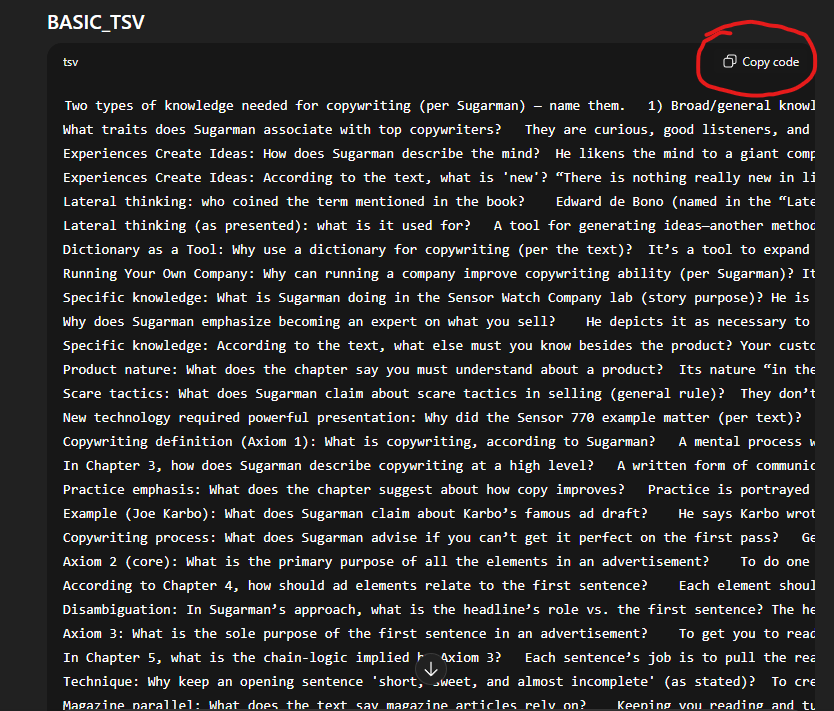
Copy this code and paste it into a Notepad. Save that as a .txt file. The name doesn’t particularly matter as long as you know where to find it.
Note: If ChatGPT had to break up your document, you may need multiple .txt files.
Step 3 - Import
Import the .txt file into Anki.
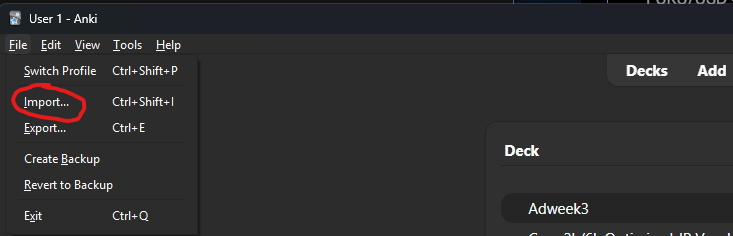
Once it is imported, you’ll get a screen like the one below. Note especially the circled sections.
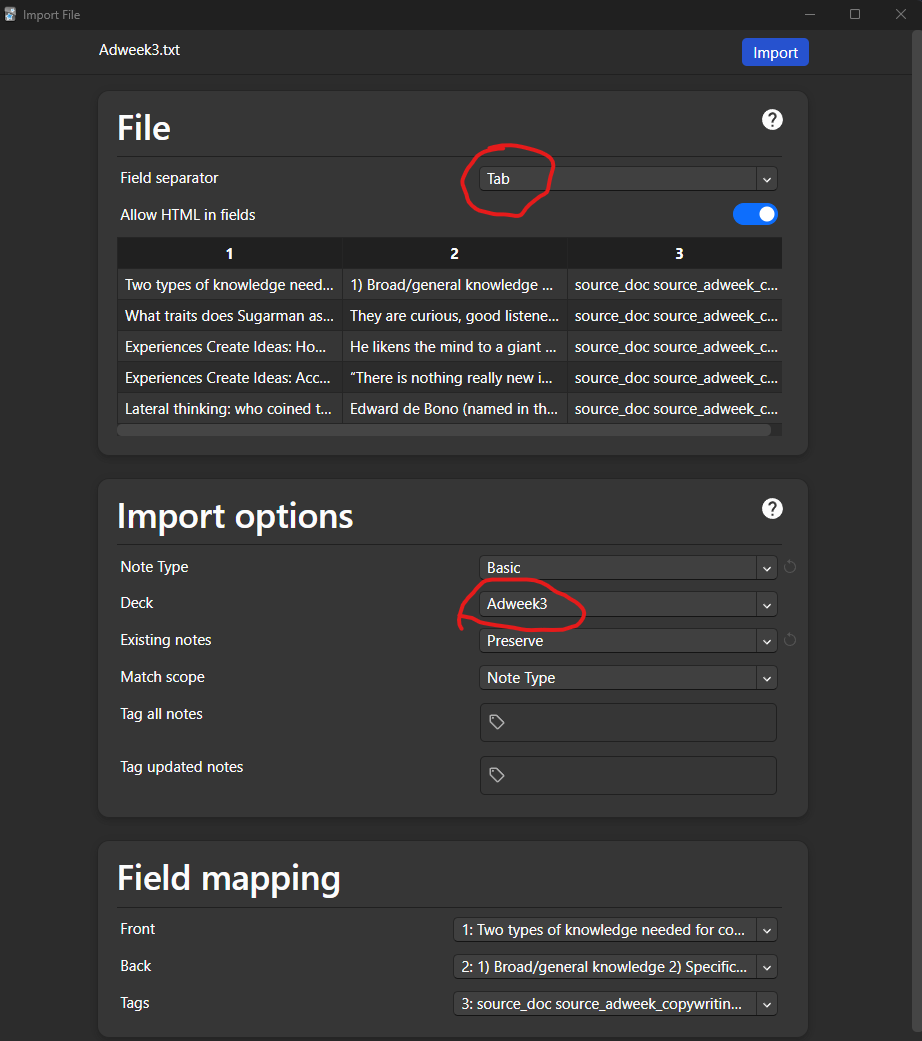
It is critical you have the correct deck selected (the new deck we created earlier).
Warning: If you do not select the correct deck, you may end up accidentally adding the cards to an unrelated deck, and it can easily become a nightmare.
If you are having to import multiple .txt files (i.e. the document was exceptionally long and had to be broken up), this is fine but be sure the Existing Notes field is set to Preserve.
Be sure also the Field Separator option says Tab. Other fields should resemble what you see in the screenshot. The prompt I’ve provided will ensure you don’t have to mess with Field Mapping, but worse case-scenario it should be:
Front: (Column) 1:
Back: (Column) 2:
Tags: (Column) 3:
Step 4 - Final Adjustments
Voila. You now have your Anki deck.
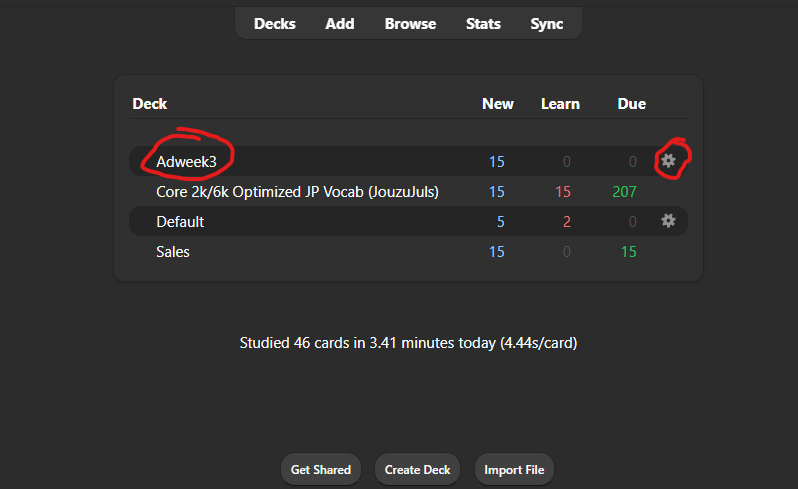
Click the cog icon (circled above) to go to Options and we’ll change the following fields:
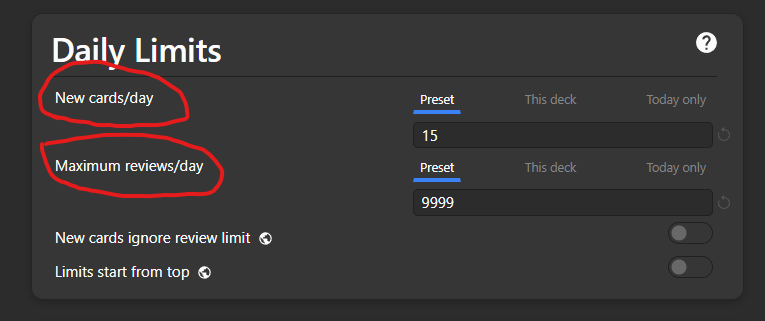
New cards/day: Adjust this according to how much time you can put in to study. It quickly stacks up. I typically do 15 new cards daily and this can amount to 30 minutes of studying per day, depending on the deck and topic. More approachable would be 5 new cards per day, and this is easily no more than 5 - 10 minutes of studying (or less).
Maximum reviews/day: Set this to 9999. This ensures there’s no cap to your total number of reviews. What this means is, if you get behind or skip a day of studying, the number will keep climbing. This encourages me to stay consistent or otherwise know I’ll have a heavy studying day where I need to catch up.
Step 5 - Learning Accelerated

Time to start studying.
You can now repeat this process for any text, any document, and any PDF and quickly and consistently test your knowledge using an AI-generated custom knowledge flashcard deck.
Combine this with reading, listening, and other forms of knowledge immersion and you will 10x your rate of learning overnight.
You are now a smarter human. You’re welcome.
- Lee
P.S. If you run into any problems, send me a DM on Substack and we’ll sort it out. If I make any updates/improvements to the prompt, I’ll also update it here — so feel free to bookmark this and share it around to anyone who could use it.
Still reading? Check out this other post by Lee Winter:
Understatement!
> If you do not select the correct deck, you may end up accidentally adding the cards to an unrelated deck, and it can easily become a nightmare
NotebookLM may be your solution to the manual flash card creation. They have a built in feature.
I use Gemini and NBLM paired to do exactly what you are doing here.